

Ship your Odoo sales orders with the ROZETKA Delivery to be different and convenient for your customers
The solution enables you to generate shipments based on customer sales orders or as standalone service documents, instantly calculate shipping costs, validate waybills with parcel tracking numbers, print shipping labels, and monitor status updates in real time.
| Availability |
Odoo Online
Odoo.sh
On Premise
|
|---|---|
| Compatibility |
Community
Enterprise
|
| Technical Name | delivery_rozetka |
| Version | 20.0.1.0.0 |
| License | OPL-1 |
| Category | |
| Support | Free 60 days support and 360 days bug-fixing |
Use Case

Jorem ipsum dolor sit amet, consectetur adipiscing elit. Nunc vulputate libero et velit interdum, ac aliquet odio mattis. Class aptent taciti sociosqu ad litora torquent per conubia nostra, per inceptos himenaeos.
Forem ipsum dolor sit amet, consectetur adipiscing elit. Nunc vulputate libero et velit interdum, ac aliquet odio mattis. Class aptent taciti sociosqu ad litora torquent per conubia nostra, per inceptos himenaeos.
Dorem ipsum dolor sit amet, consectetur adipiscing elit. Nunc vulputate libero et velit interdum, ac aliquet odio mattis.
It is a long established fact that a reader will be distracted by the readable content of a page
Korem ipsum dolor sit amet, consectetur adipiscing elit. Nunc vulputate libero et velit interdum, ac aliquet odio mattis. Class aptent taciti sociosqu ad litora torquent per conubia nostra, per inceptos himenaeos.
Korem ipsum dolor sit amet, consectetur adipiscing elit. Nunc vulputate libero et velit interdum, ac aliquet odio mattis.
Odoo App Installation
Upload modules
Upload modules from the ZIP archive to your Odoo hosting, or a GitHub repository connected there.
Place the unzipped modules in your custom add-on directory and restart the Odoo system service.
Update App List
After restarting, activate the Developer Mode, and go to the Apps menu.

Click on Update Apps List to fetch the new modules in the list.
Activate the App
Install the new module, finding it by name and clicking on the Activate button.
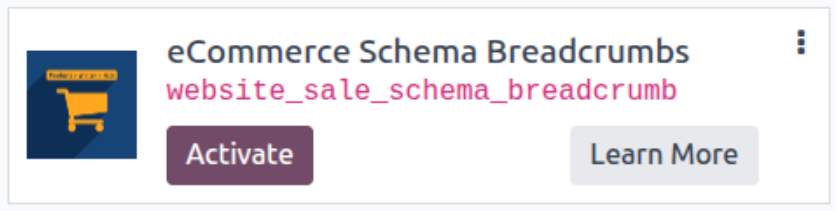
* If you don't see the module, try to remove the default Apps filter from the search bar.
Configuration
Follow the instructions in the module description to complete the installation process and start using the app.
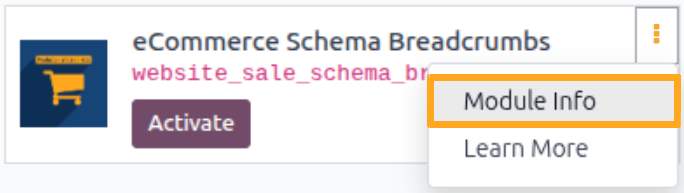

Manual

User Settings
After installing the module, configure user access rights for the Delivery Hub menu. Navigate to user settings, go to the Access Rights tab, and select the role in the Delivery Hub section:
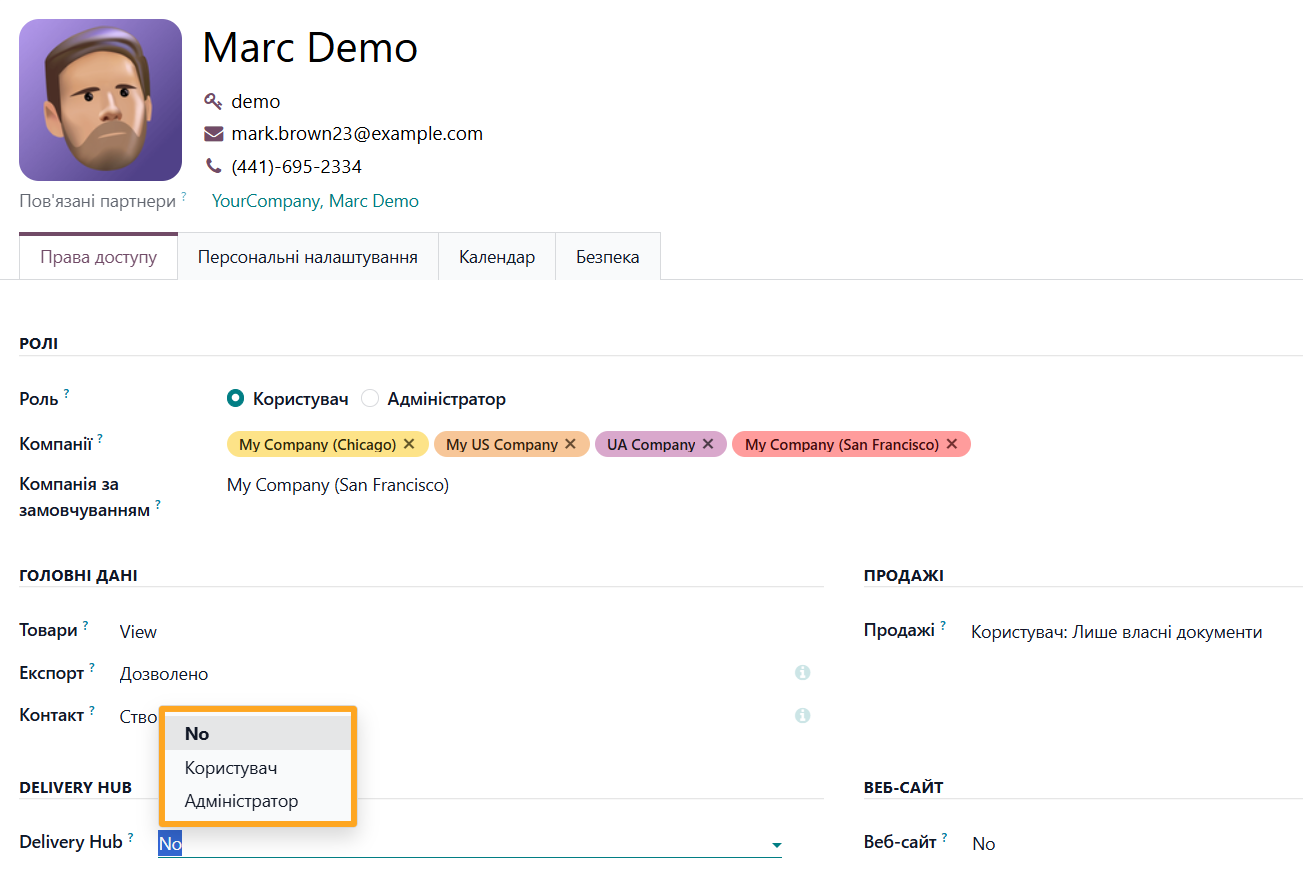
- No: No access to the Delivery Hub menu
- User: Access to view information
- Administrator: Full access and management rights

Menu Overview
The Delivery Hub menu contains the following sections:

- Accounts: List of delivery service accounts
- Notes: Delivery note (shipment/parcel) management
- Waybills: List of all created waybills with parcel tracking number
- Contacts: List of partners and delivery addresses
- Products: Product list
- Catalogs: List of cities and pickup/drop-off points
- Configuration: General settings

Connection
To integrate Rozetka Delivery into Odoo, you need to add and configure a delivery provider account.
Adding an Account
Open the Delivery Hub — Accounts menu and click the New button to create a new delivery provider account.

Fill in the pop-up window as follows:
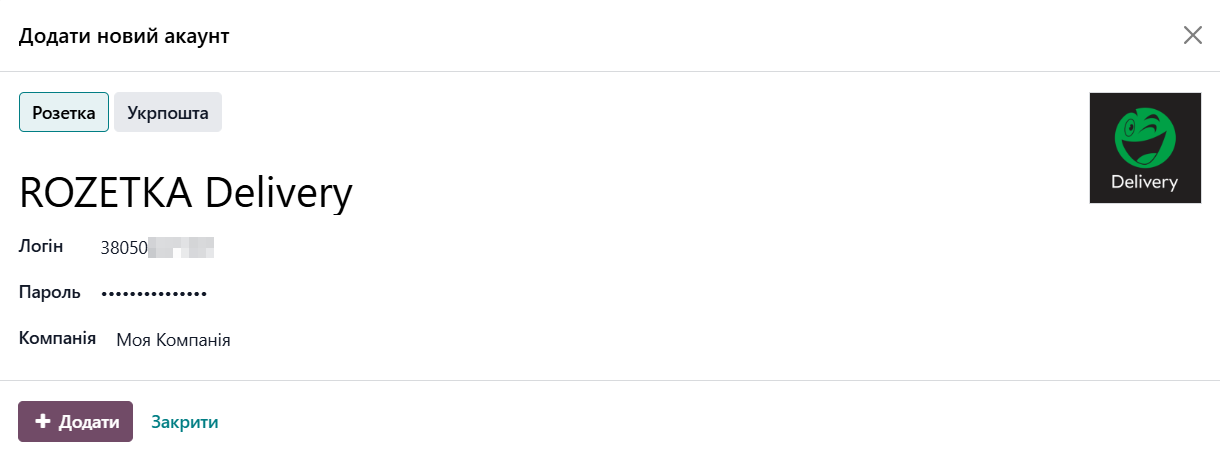
-
01Click on the Rozetka delivery provider type
-
02Enter a Name and your account credentials — Login and Password
-
03Select a Company (if using multiple companies)
-
04Click Add
Account Settings
Specify default values for the added account on the Settings tab. The module automatically populates new shipments with these values.
First, specify sender data by clicking the Add Sender button in the corresponding field of the General section.
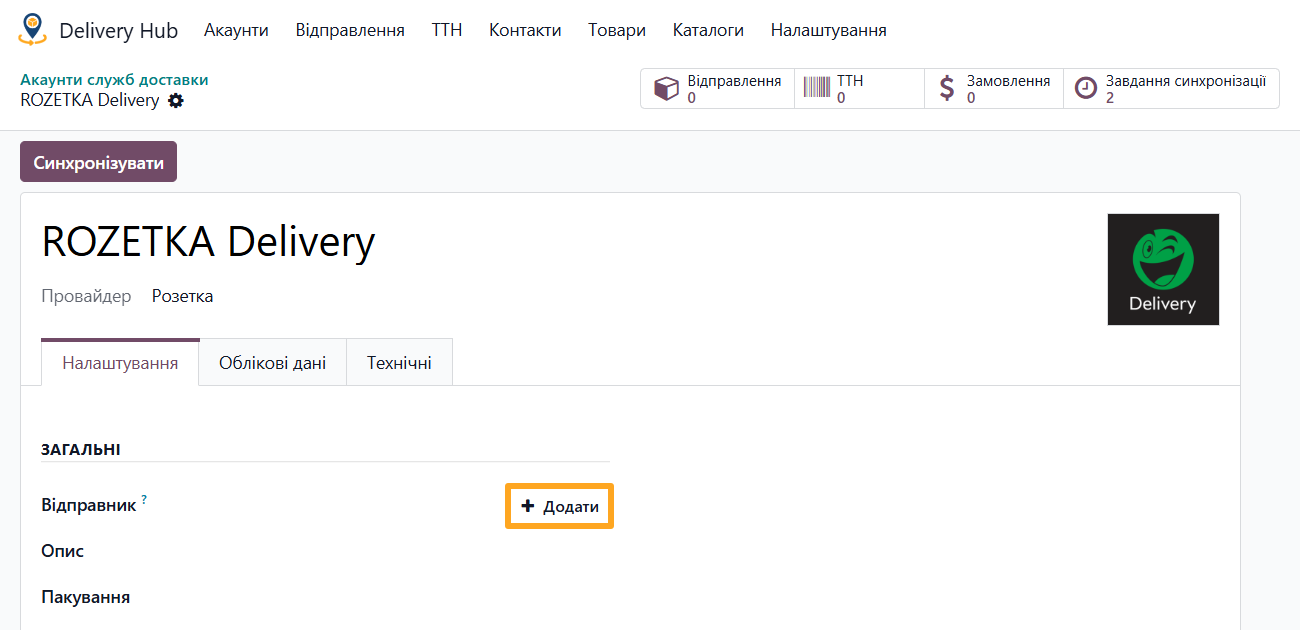
Fill in the contact creation pop-up:
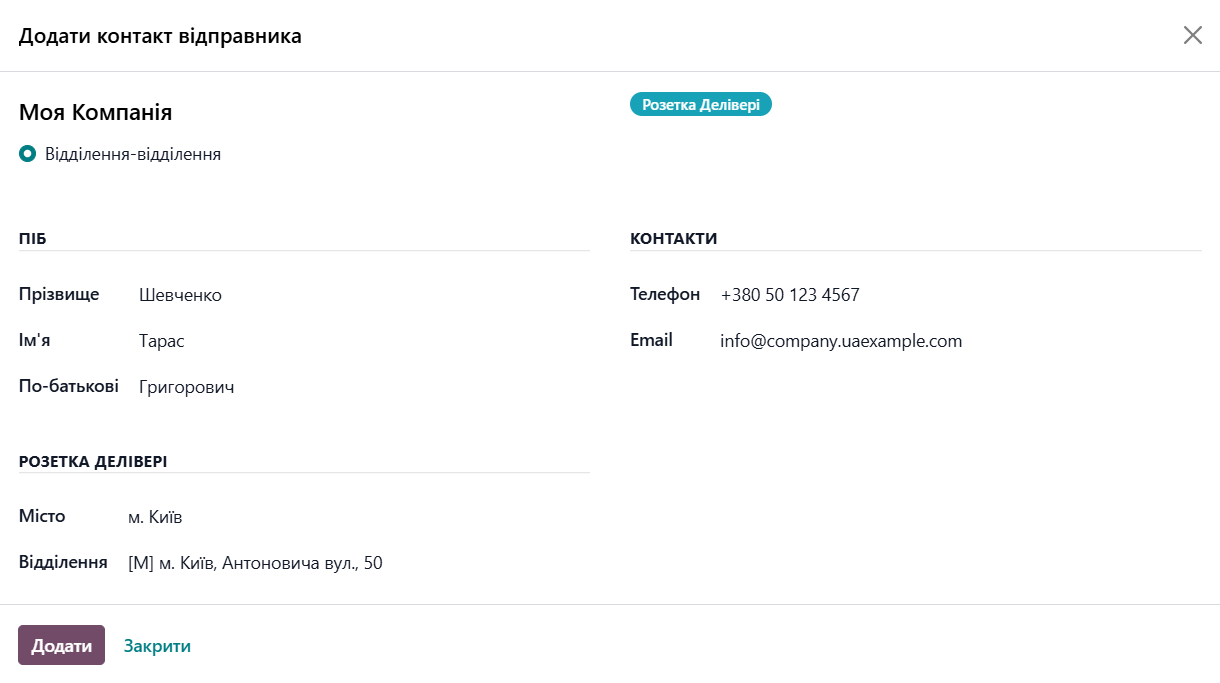
-
01Enter personal data such as Full Name, Phone number, and Email
-
02Select the City and Rozetka branch from the Department list
-
03Click Add
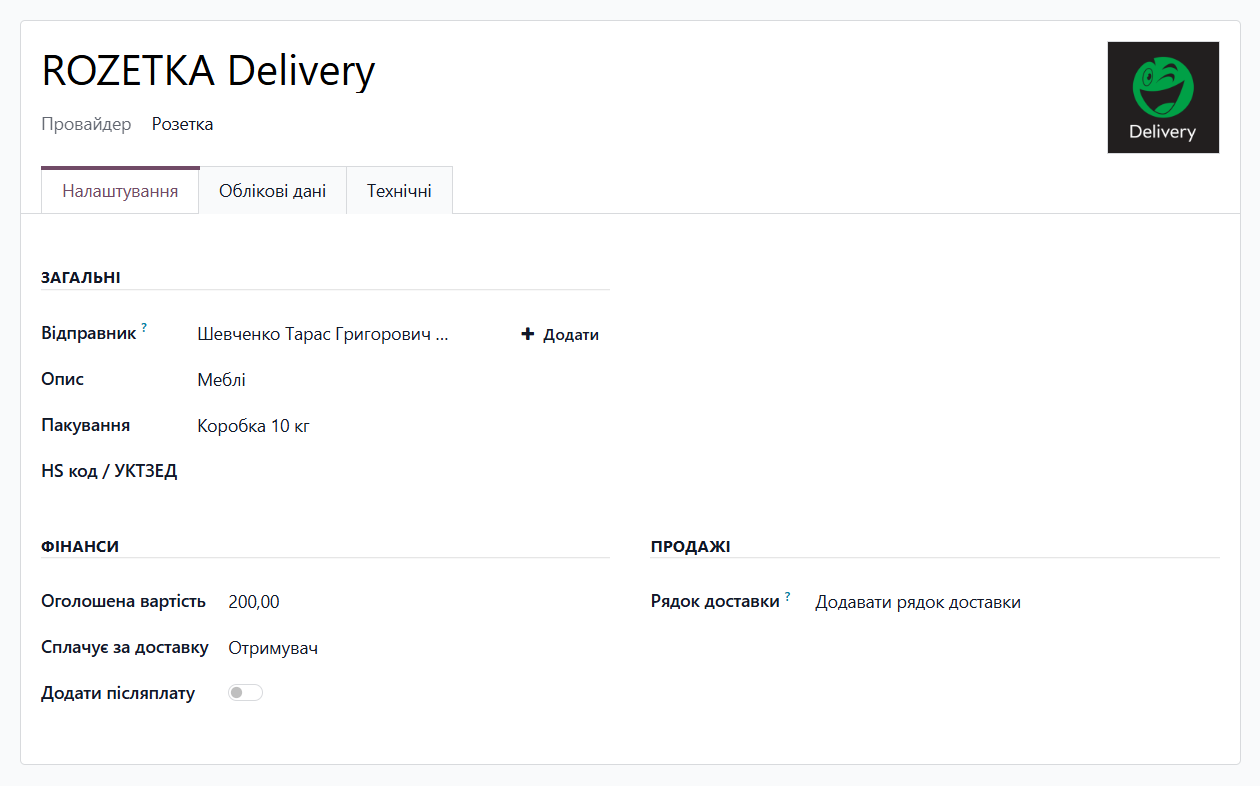
Next, specify the following default information:
- Description: shipment description
- Package: shipment package template (manage in the Configuration — Package Templates menu)
Specify payment information in the Finance section:
- Declared Amount: default value of the declared amount for the shipment
- Pays for Delivery: sender or recipient pays for the delivery service
In the Sales section, select an action for the delivery line in the order:
- Add a delivery line: standard Odoo action where a delivery line is added to the order with the delivery cost specified.
- Add a delivery line with 0 price amount: a delivery line is added to the sales order, but its cost is always zero and does not affect the total order amount.
- Do not add a delivery line: a delivery line is not added to the sales order at all.

Additional Settings
The module reduces manual actions and speeds up shipment creation. Added delivery addresses and product settings are saved in the system for reuse.
Delivery Addresses
Delivery data for company customers is managed on the partner form. Open the Delivery Hub tab and click Add Address to add a new delivery address and contact person details for the recipient.
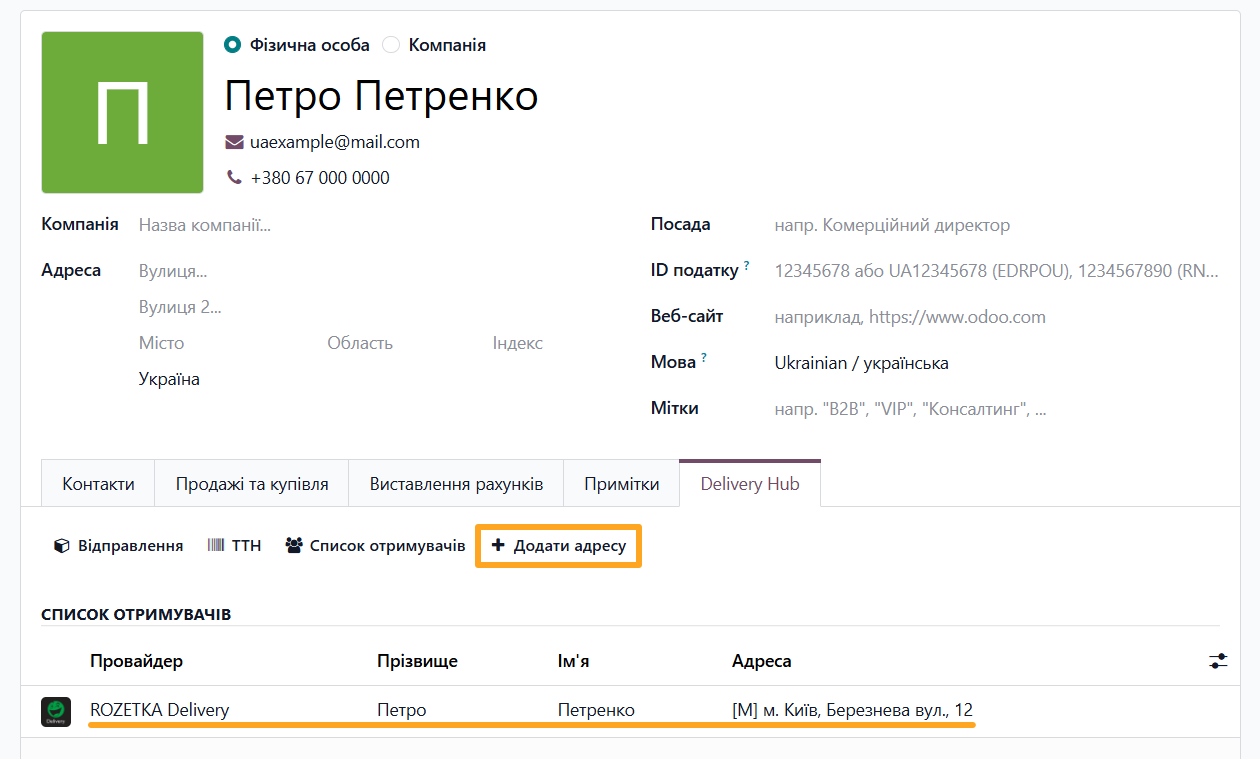
Fill in all required fields in the window, after which the added address appears in the Recipients section. This way, you can add multiple different addresses for a partner.
Other available actions on this tab:

- Notes: view all shipments
- Waybills: view all created waybills
- Recipients: view delivery data in the list
Product Settings
The delivery settings are also available at the product level. Go to the Inventory tab and in the Delivery Hub section:
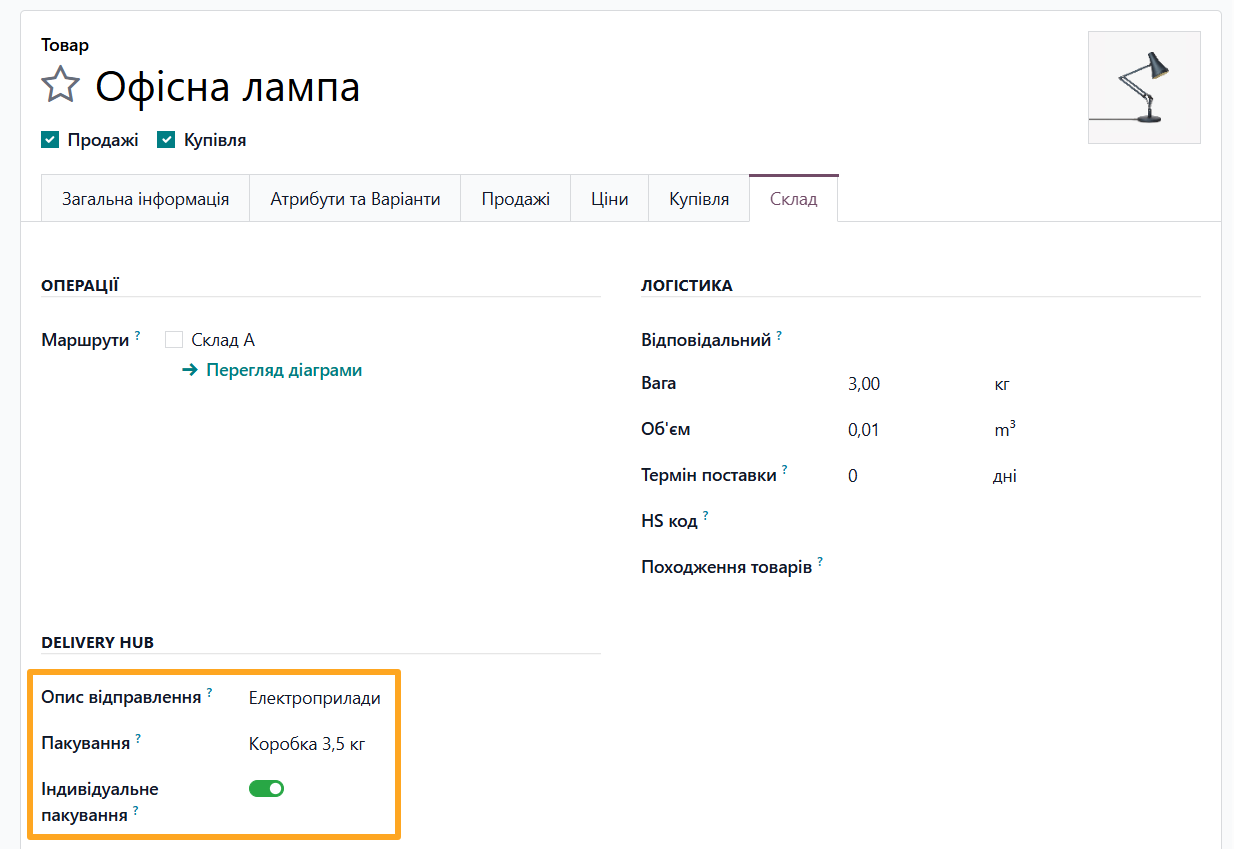
- Select a Delivery Description from the list or create a new one
- Select a Delivery Package template from the list or create a new product-specific package
- Enable the Individual Package option if the product cannot be packed together with other items

Creating a Shipment
The solution allows creating Rozetka Delivery shipments in Odoo in several ways:
- From a sales order
- As a standalone shipment
From a Sales Order
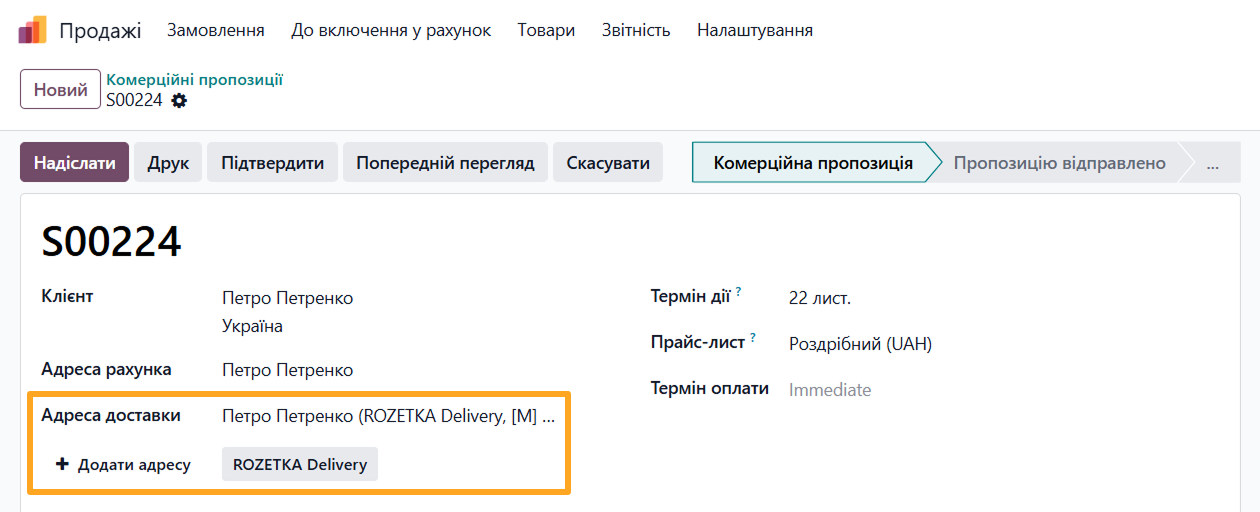
The first, standard method in Odoo is adding a delivery to a sales order. Create a new order, add products, and select a customer. If the customer card already has a Delivery Hub address, it is automatically populated in the Delivery Address field.
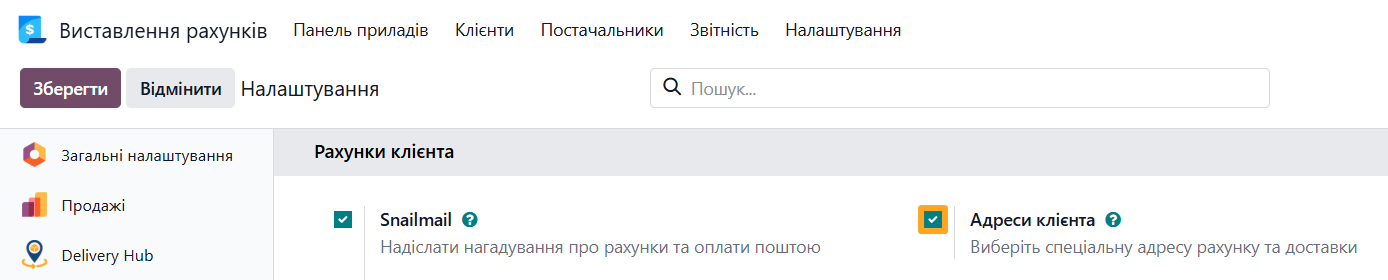
To manage customer invoicing and delivery addresses in sales orders, it is recommended to enable the Customer Addresses option in the Invoicing settings of the Customer Invoices section.
If the customer has multiple addresses for Rozetka, specify the carrier type by clicking ROZETKA Delivery and select an address from the list. To specify a new delivery address, click Add Address.
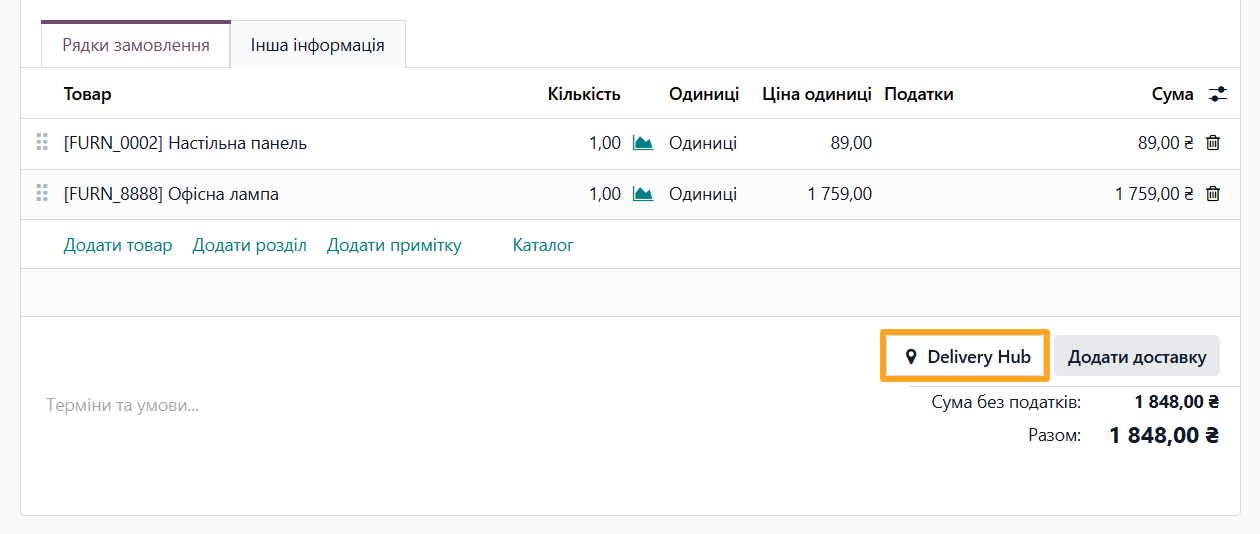
Next, add delivery to the order. To do this, click the Add Shipping button located under the product list.
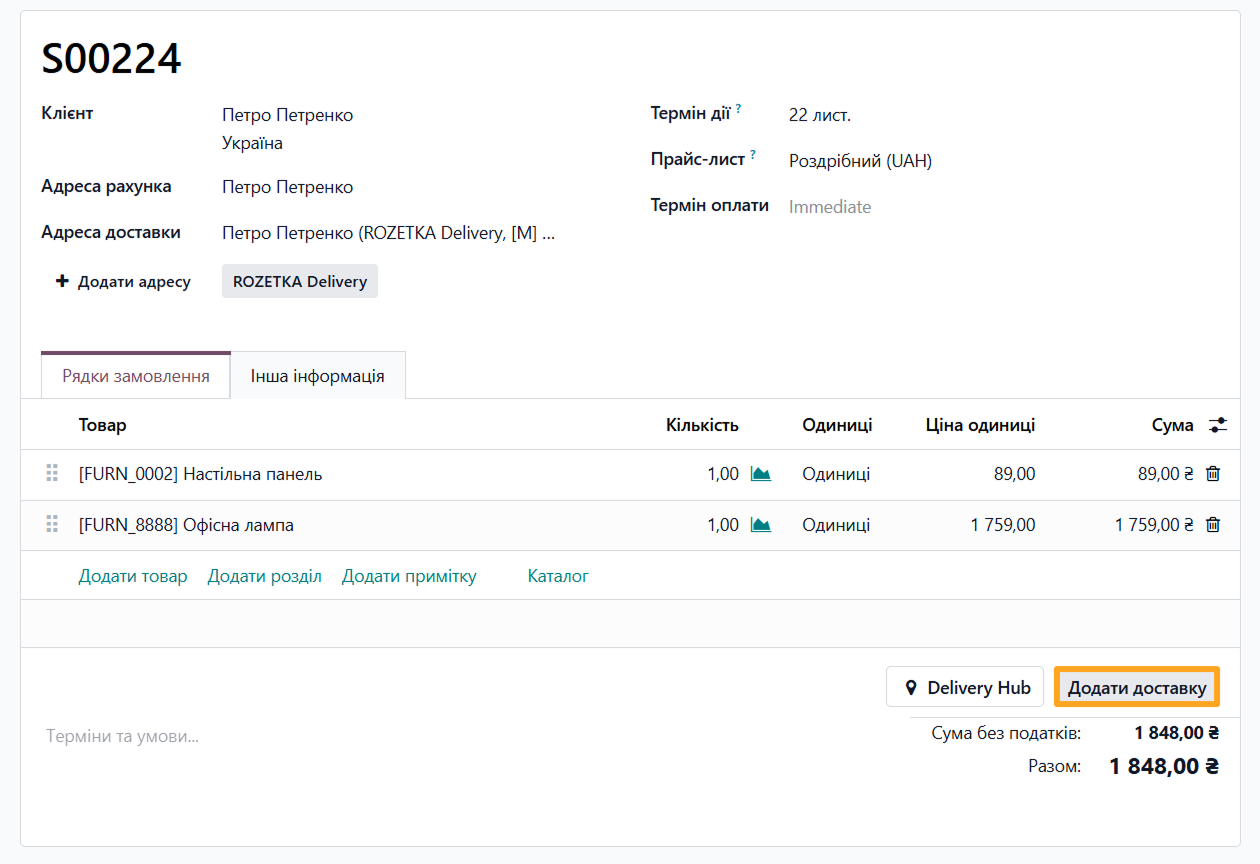
In the pop-up window:
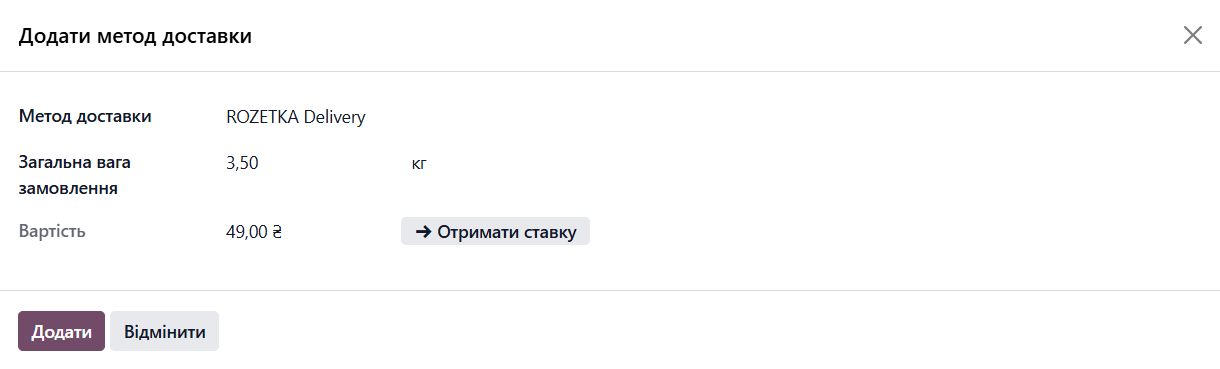
-
01Select Rozetka Delivery as the Shipping Method
-
02Calculate the shipping Cost by clicking Get Rate
-
03Click Add
A new line is added to the order or not, depending on the delivery provider account settings.
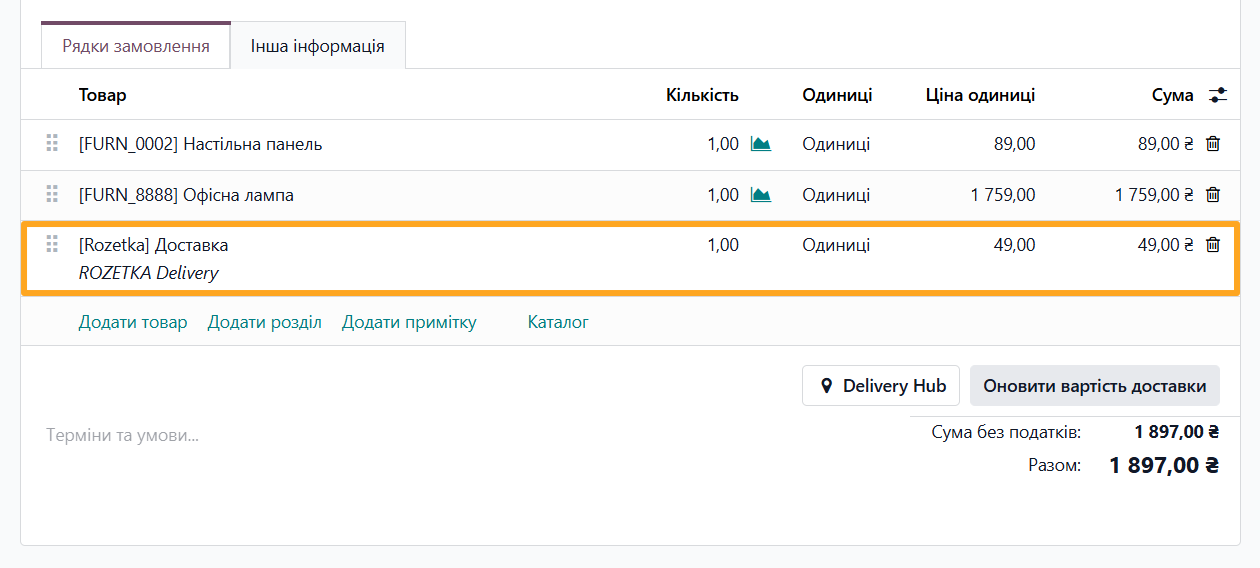
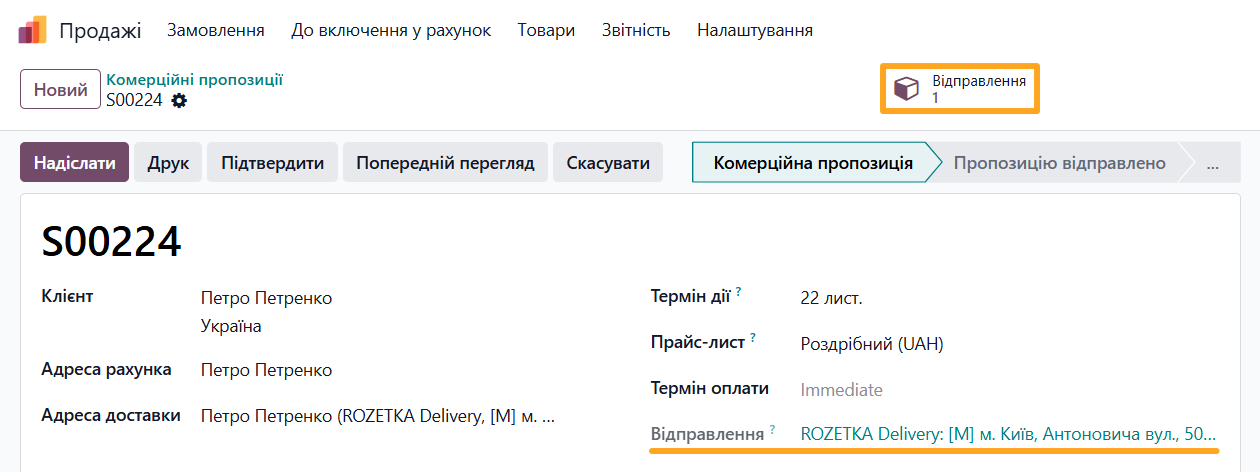
To view and edit shipment data, click the Delivery Notes button at the top of the page or the link above the product list.
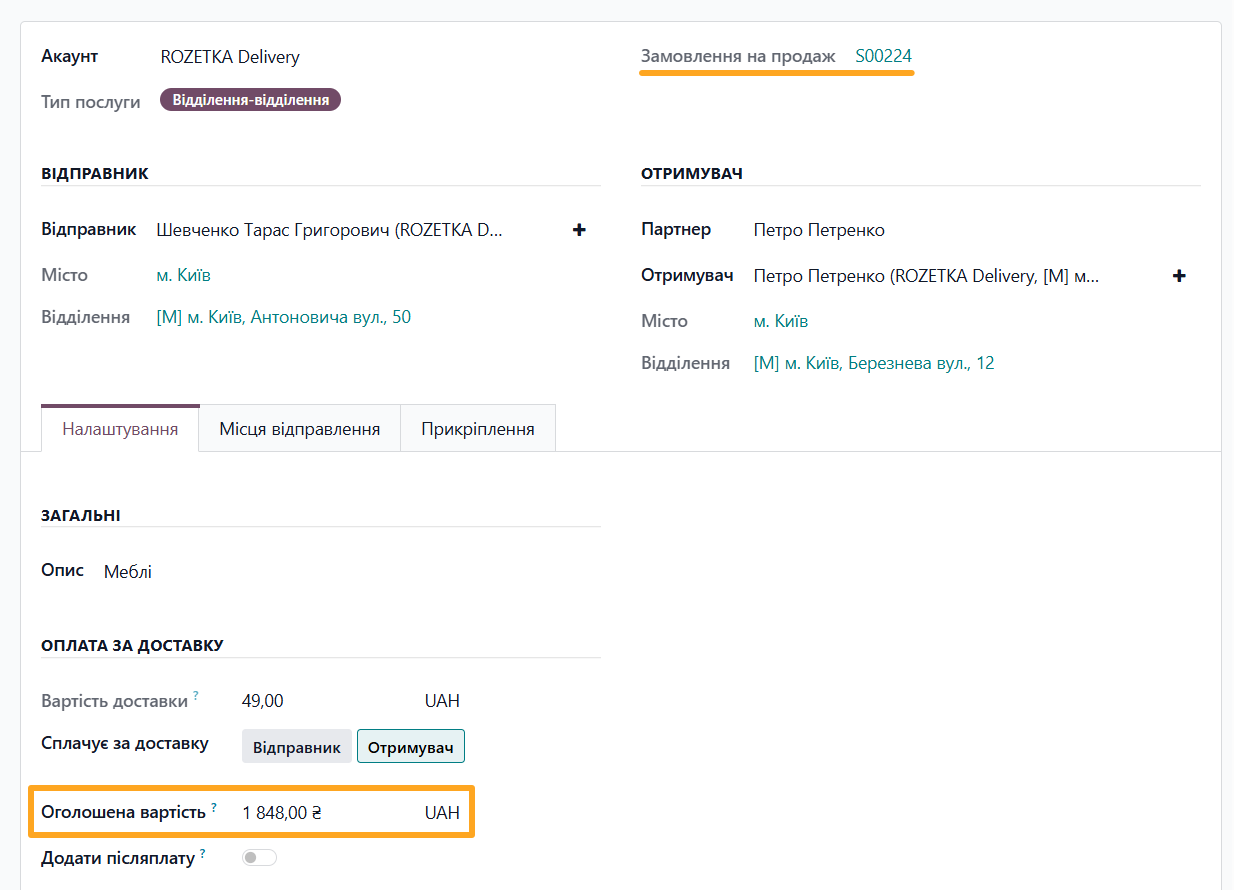
For shipments created from a sales order, the declared amount is populated automatically.
Another way to add delivery to a sales order is using the Delivery Hub button. In the pop-up window, fill in the shipment information and save the data. For details on creating this document, see the next section.
Standalone Shipment
An alternative method is creating a shipment without linking it to a sales order. This can be useful when sending documents or for service shipments. Open the Delivery Hub — Notes menu and click New.

Select a delivery provider account, specify sender and recipient details, and fill in other required fields.
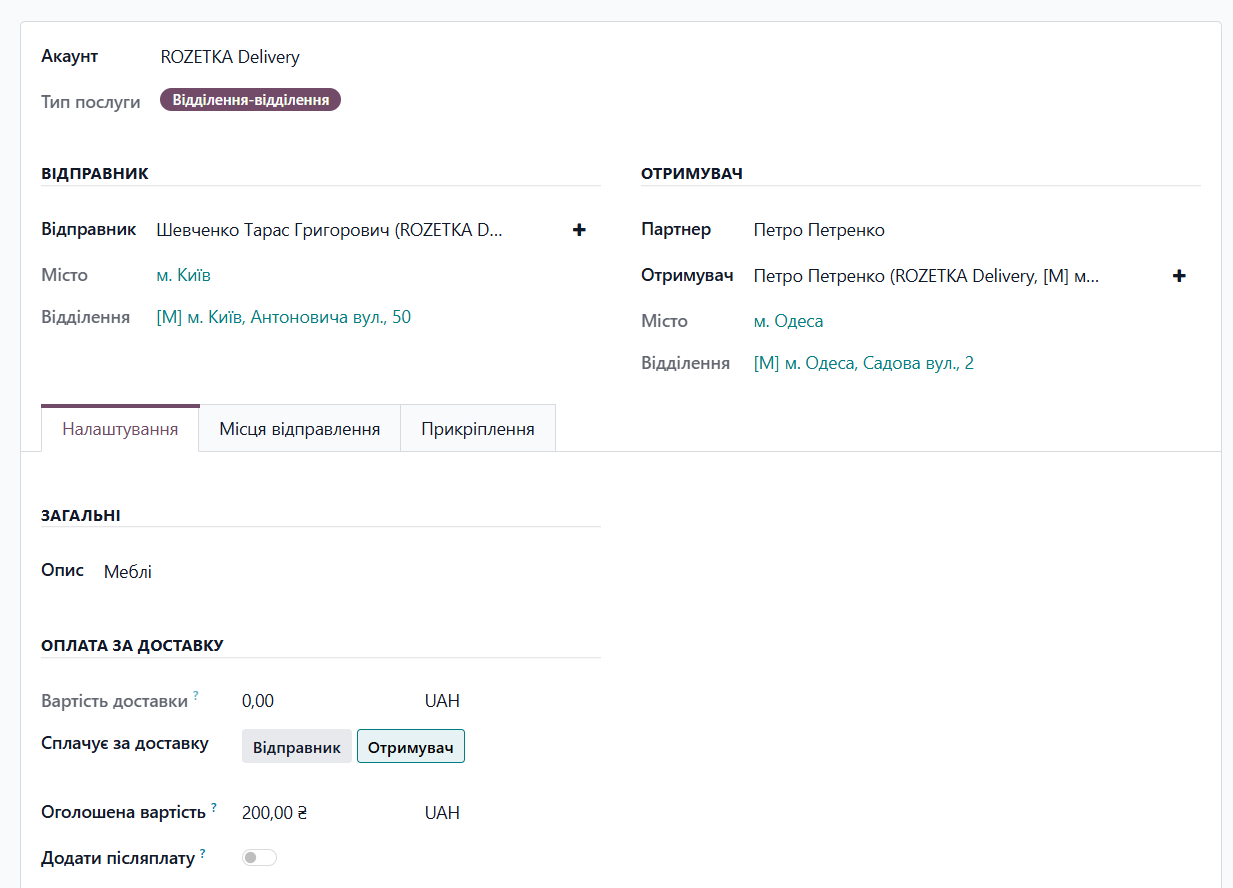
If default values were set in the Rozetka Delivery account settings, they are automatically populated in the new shipment. These parameters can be changed if needed.
Dimensions and Places
Add dimensions and places on the corresponding tab. Places contain information about the description, weight, dimensions, and other shipment data.
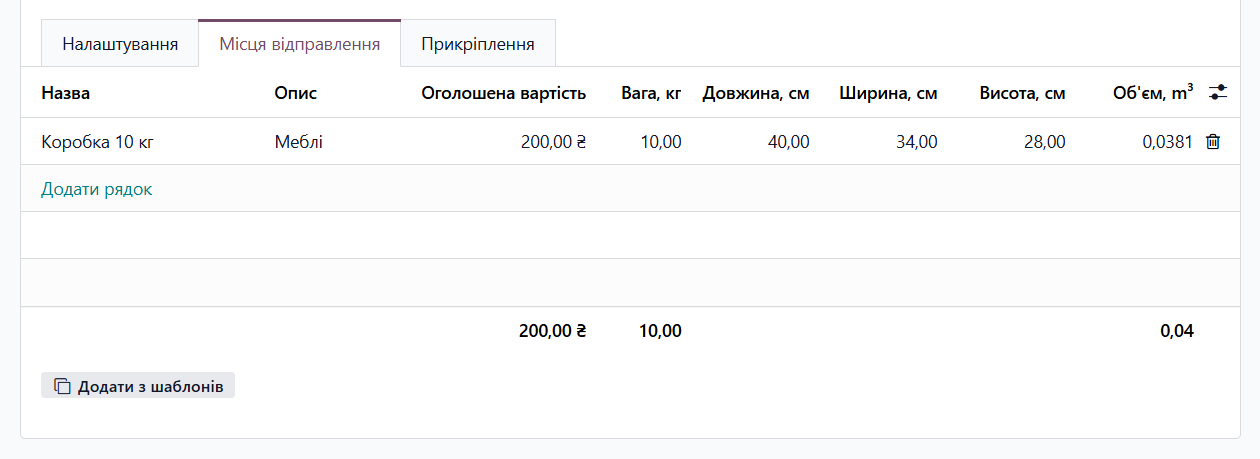
You can enter values manually or use pre-configured templates by clicking Add from Templates.


Shipment Actions
The Odoo Rozetka Delivery integration module allows you to perform the following actions with shipments:
- Calculate shipping costs
- Create a waybill with a parcel tracking number
- Update shipment data
Shipping Costs
Once all required details are filled in, calculate the shipping cost by clicking the Get Rate button at the top of the shipment form.

Creating a Waybill
To create a waybill, click the Confirm button.

After confirmation, the parcel tracking number appears in the Waybill field, where you can copy it.

Updating Data
After the waybill is created, you can edit the shipment details. Make the necessary changes and click Update to synchronize them with Rozetka Delivery.

Waybill
Once the shipment is confirmed, the module generates a waybill. This document contains a status change log and other details related to the created waybill.
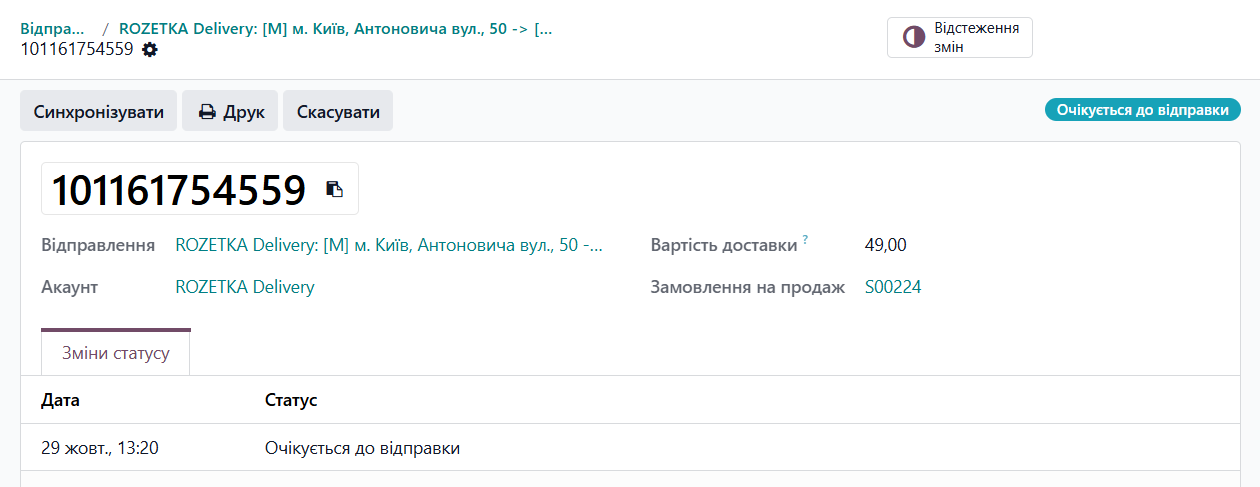
The following actions are available for waybills:
- Sync — manually update the TTN status
- Print Label — print the shipping label with the parcel tracking number
- Cancel — cancel the shipment on Rozetka Delivery and archive the record in Odoo
These actions are also available directly from the delivery note document.

Changelog
17.0.1.0.0 2024-10-11
- Init version.
18.0.1.0.1 2026-10-06
- Improve views for Rozetka departments.
- Improve UA translations.
- Improve getting of the Rozetka delivery price.
18.0.1.0.0 2026-02-13
- Migration from 17.0.
19.0.1.0.1 2026-09-15
- Improve views for Rozetka departments.
- Improve UA translations.
- Improve getting of the Rozetka delivery price.
19.0.1.0.0 2026-05-22
- Migration from 18.0.
20.0.1.0.0 2026-10-05
- Migration from 19.0.
Resources
Manage order deliveries, create shipments, track waybill statuses, and use integrated services for business customers

How to integrate with the Ukrposhta shipping provider to deliver your Odoo products

Step-by-Step Guide to Connecting Nova Poshta to Odoo